
Imagine a customer has entered your bank branch on a random Friday afternoon and is ready to stand in line. But there they see a bright digital sign right by the door: wait time only 3 minutes, mortgage rates, and a brief video on how to make an appointment on their phone screen. This change makes them feel their local branch is no longer a burden but a carefully coordinated service center. This is what a bank digital signage promises.
What is Bank Digital Signage?
Digital signage is any system of screens, LED, LCD, video walls, tablets, which are centrally controlled to display dynamic content. In banking, the term generally refers to:
- Customer-facing lobby screens, drive-through screens, ATM surround screens, teller screens, kiosks.
- Break rooms, back offices, or call centers that face employees.
Most systems are cloud-based, enabling marketing or operations teams to push updates within seconds. APIs of modern platforms also integrate with data sources, such as think rate feeds, queue management, and CRM data, to automatically personalize what is shown on each display.
“The minute a printed poster is printed, it has already fallen into disuse. With digital signage, you give up permanence in favor of flexibility, and flexibility is everything in a rate-sensitive business.”
Why Banks Invest in Digital Signage
- Reduced perceived wait time: Moving graphics keep visitors occupied, reducing abandonment.
- Increased product awareness: The rate of cross-selling of under-penetrated products (e.g., insurance, HELOCs) increases when an offer is displayed in the context of the teller line.
- Regulatory flexibility: In cases where the FDIC or FCA changes the wording of disclosures, compliance departments can replace a slide across 600 branches within minutes.
- Increased brand exposure: Video walls make the interior look modern, and technologically inclined customers will associate the brand with tech-savviness.
- Information-guided decisions: Real-time analytics on dwell time and content performance drive wiser campaigns.
Best Use Cases for Bank Digital Signage
1. Queue Management & Wait-Time Transparency
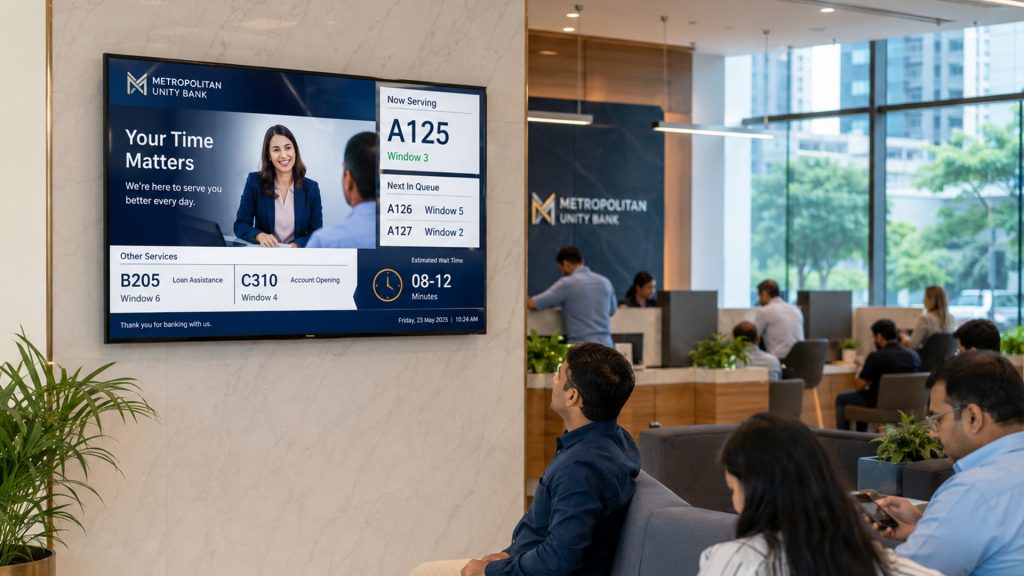
Long queues are the top in-branch frustrations. Banks such as BBVA and U.S. Bank place little screens over teller bays, which:
- Display ticket numbers in real-time.
- Give suggestions on how to deposit checks through mobile devices while waiting.
- Publicize rapid facts. Did you know: ATM withdrawal limit or ATM fraud warning.
Complaints in my local credit union decreased 17 percent in the first quarter after the addition of simple wait-time screens, anecdotal, but difficult to deny.
2. Cross-Selling & Upselling (Without Hard Sell)
Micro-Targeted Offers
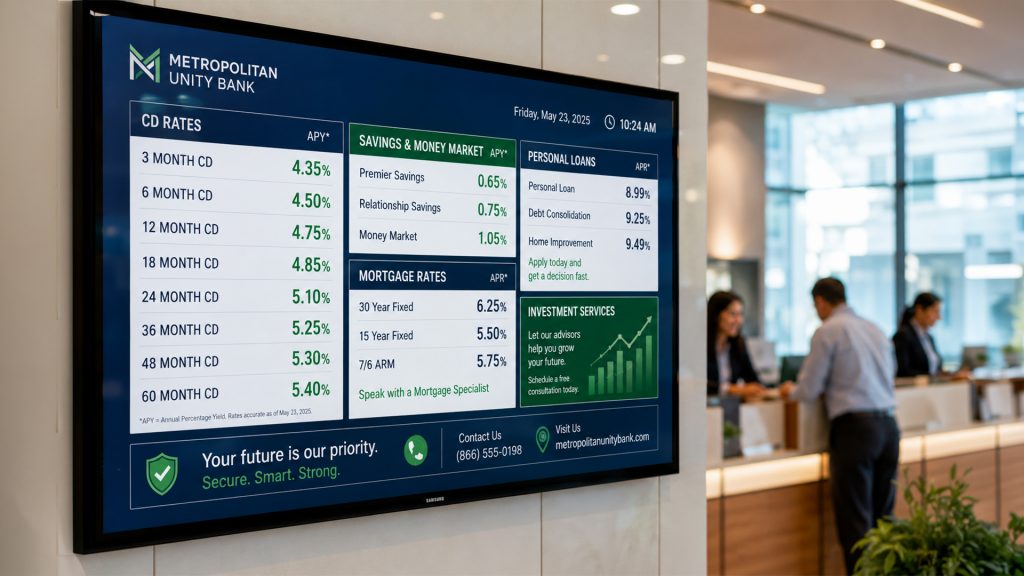
A screen at the service desk can be rotated using CRM integration:
- Lending rates on auto loans to visitors with an expiring lease in profile.
- Promotions of travel reward cards in the holiday seasons.
- QR codes to pre-filled application forms.
Contextual “Reminder” Banners
- By coin-counting machines: a little slide indicating high-yield savings.
- Next to the safe deposit box corridors: life insurance spotlight (“Protect what you store here”)
3. Compliance & Mandatory Disclosures
The regulators demand a clear demonstration of FDIC membership, Equal Housing Lender icons, and, occasionally, fee schedules. Digital signage eases:
- Immediate notification of fee structure changes.
- Automated timing to make disclosures seem the legally mandated amount of time per hour.
- Record keeping, capturing what was displayed, when, and where- important during audits.
4. Community Storytelling & CSR Highlights
One of the regional banks in Ohio has a lobby video wall that is dedicated to:
- Sports scores of local high schools (through RSS feed).
- Last week, photos of the habitat build were volunteered.
- Future financial literacy training with registration QR code.
The branch manager informed me that the number of people attending the seminars doubled after the wall was installed, which is evidence of effective communication.
5. Emergency Messaging & Business Continuity
In extreme weather or security events, centrally controlled screens are switched in real-time to:
- Evacuation routes
- Shelter-in-place instructions
- Hotline numbers
Since the signage network tends to be on a separate VLAN, it will continue to operate even if primary systems fail, providing a backup means of communication.
6. Wayfinding in Flagship or Campus-Style Branches
Big-city flagships may turn into mini-airports. Touchscreen directories are interactive and assist:
- Referral of direct clients to wealth management vs. retail banking.
- Indicate the availability of ATMs and the location of restrooms.
- Provide live video conferencing with remote consultants.
7. Internal Communications & Performance Dashboards
Digital bulletin boards bring the staff on track:
- Branch KPIs in real-time (deposits, NPS scores, number of referrals)
- HR reminders: new e-learning modules, open enrollments.
- Holiday: birthdays, sales anniversaries.
Common Mistakes to Avoid

| Arrange monthly firmware and operating system updates; divide the network. | Why it Hurts | Quick Fix |
| “Set-and-Forget” Content | The fixed playlists become boring; the customers lose interest. | Develop a 90-day content calendar. Assign ownership. |
| Poor Screen Placement | Glare, unusual angles, or hanging too high minimise visibility. | Carry out a basic walk-through inspection before installation. |
| Ignoring Accessibility | Small fonts or colour schemes do not pass the ADA contrast ratios. | 18-point text or larger; contrast checker test. |
| Overloading with Ads | Constant promotions are akin to noise and decrease trust. | Follow the “60/30/10” rule: 60 % info, 30 % brand, 10 % promo. |
| Forgetting Audio Policies | Screaming circles in hush puppies irritate tellers. | Use videos with subtitles, turned off sound; use only in open areas. |
| Neglecting Security Patching | Soft targets are unpatched media players. | Arrange monthly updates of firmware and operating systems; divide the network. |
| Skipping Analytics | None of the measures equals no evidence of ROI. | Play counts, dwell time, and product uptake correlate. |
Real-World “Ouch” Story
One mid-size bank installed 200 lobby screens, yet it did not provide marketing with remote access to CMS. IT was forced to manually update by means of USB each time the rates changed – sometimes days behind schedule. The result? Advertisements for mortgages with outdated APRs remained active, prompting regulators to issue warnings. Lesson: workflow is always better than hardware glitz
Practical Recommendations for a Winning Rollout
- Start small, measure, scale. Test pilot in three branches with varying demographics to receive feedback.
- Establish an interdisciplinary task force. The marketing, compliance, IT, and branch personnel should be represented at the table.
- Use templates. Ready-made layouts will save designers the time spent reinventing disclosures every time.
- Leverage API integrations. Pull real-time data – rates, stock tickers, queue details – to update the screens automatically.
- Train staff. Messages can be reinforced using tellers who are aware of what is on the screens.
- Content, not screens, budget. The industry average is 30 percent hardware and 70 percent ongoing content and licensing.
- To explore content planning more, our internal guide, Branch Content Calendars 101 (accessible to subscribers), can help.
Conclusion
Digital signage in banking is no longer a new phenomenon; it is a powerful tool for work and marketing when implemented wisely. Display screens can reduce wait times, improve compliance, and make your brand feel more human, but only when you use the right content and place it appropriately, and maintain them rigorously.
Are you willing to transform your branch network? This month, audit one site: identify areas of dwell, evaluate existing posters, and draw two or three screen positions. Start there by creating a content calendar and trying the free trial of Disploy. This can be achieved through small steps today that will be rewarded, financially and experientially, by the end of this quarter.