
Walk into any thriving coworking space, and you will see digital signage in action. Displays outside meeting rooms, at entrances, and along corridors show real-time room availability, upcoming events, and new member welcomes. These screens are not just décor. They are the operational backbone of modern shared spaces.
Coworking is scaling fast, with over 41 million members projected worldwide by 2030 (Statista, 2024). Operators are under pressure to deliver more efficiency, more community, and more value, without growing headcount. Coworking Digital signage is the high-leverage tool that makes this possible, quietly transforming how spaces operate.
Here’s how leading coworking operators use digital displays to drive frictionless room booking, dynamic event communication, and real member engagement, plus the tech that keeps it all running smoothly.
What Is Digital Signage (in a Coworking Context)?
Digital signage is a networked display system that provides dynamic content to a real-world screen. This can range from a 10″ touchscreen panel displayed next to a meeting room door to a large lobby screen listing the day’s events to a wayfinding kiosk in the lobby of a multi-floor campus.
Hardware is just the starting point. The real power is in the software, a content management system that lets operators control every screen from a single dashboard. Most platforms integrate seamlessly with tools you already use, such as Google Workspace, Microsoft 365, Slack, and member management systems like Nexudus or Cobot.
Digital signage is usually found in four different forms in the coworking environment:
- Room panels: Small touchscreens placed at eye level next to each room or desk space, displaying room availability and booking controls.
- Lobby and reception displays: Big screens in the lobby that display the day’s schedule, visitor information, announcements, and community content.
- Wayfinding kiosks: Interactive or static floor maps to assist members, visitors, and delivery staff in navigating multi-level or multi-building campuses.
- Common area screens: Displays in kitchens, lounges, and breakout areas that feature community content, event promotions, member spotlights, and curated feeds.
All of these have one thing in common: they can be updated rapidly and remotely. From a phone, an operator can run three screens in three buildings in one city, change the welcome message on the screens, advertise an imminent event, or send an emergency message to all screens in all buildings, in seconds.
Room Booking, Making Space Management Effortless
This is where a coworking digital signage system can show the highest and best return on investment. In shared workspaces, ghost bookings (meetings reserved but never attended) account for an estimated 30-40% of meeting room capacity (Condeco Workspace Report, 2023). That’s a waste of space, and space is a critical component of any coworking space, as it affects member satisfaction and income. The solution to this at the point of use is digital coworking signage combined with a booking system.
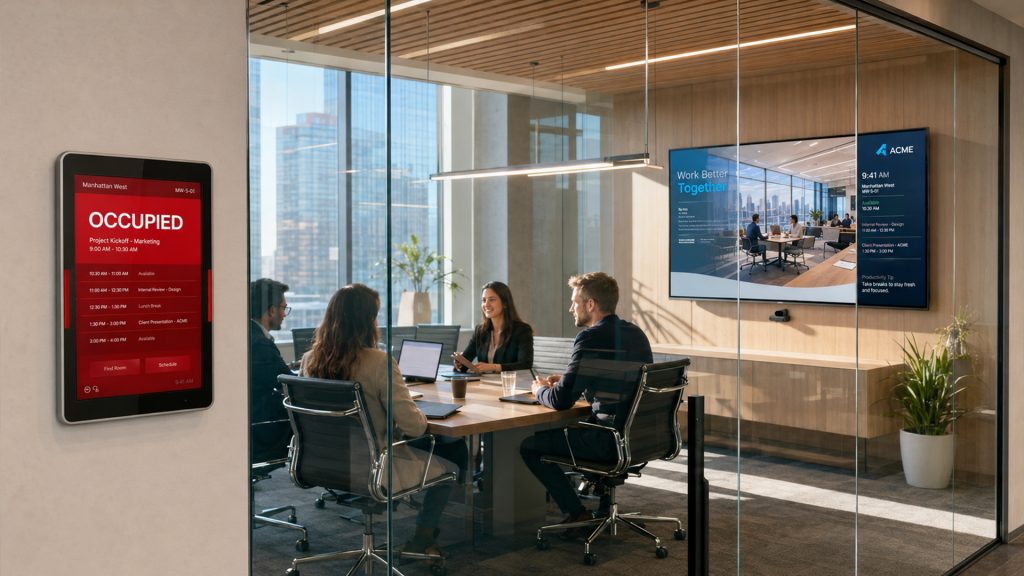
The practical aspects of its functioning
Room panels are mounted on a touchscreen outside each bookable space, displaying the current status, room name, capacity, and available equipment. If the room is free, the green indicator will be on. If it is occupied, it will be colored red, along with the booking name and duration. When walking through the space, members can at a glance determine if a room is available, without reaching for their phone or a web portal.
Calendar integration is what makes these panels genuinely intelligent. The panel is automatically updated when a member books a room via Google Calendar or Microsoft Outlook. Their check-in is confirmed through the panel (or when they scan the QR code). When no one logs in for a specified period (usually 10-15 minutes), the room is immediately removed from the pool. This no-show auto-release feature alone can reclaim 15-20% of previously lost capacity.
QR code check-in makes it even easier. The members scan a code on the panel by using their smartphone, and the booking is confirmed without touching the panel screen. This is especially appreciated in health-conscious shared settings, where many users prefer to minimize surface contact.
Ad hoc booking is also very simple. A member can walk up to any room that shows as available and tap the panel to book it immediately for 30 minutes or an hour. No need to download an application and no line at the reception. Each and every person will be able to see the booking right away.
When a hotel with many rooms and hot desks is using it, the combined impact is revolutionary. Less time spent at the front desk answering “Is room 3 free?” questions. Members are more self-reliant. Utilization data, which is automatically captured, provides operators with the information they need to optimize room availability over time.
Events & Wayfinding, Keeping the Community Informed
Without an exciting events calendar, a coworking space is just an office. Events are the way to develop culture, fund membership dues, and distinguish oneself from the serviced office across the street. The challenge has always been communication. How do you ensure that members know what’s on?
The open rate for coworking member newsletters is usually 25-35%, meaning that even well-written messages may not be read by most members. Push notifications on member apps work better, and “notification fatigue” is a reality. Ambient, constant visibility is something that neither channel can achieve; that’s what digital signage brings. As members pass through it, it appears to them as if they are opting in.
Dynamic event boards
A display set up in the lobby greets everyone who walks in, and the screen announces today’s and tomorrow’s events, including a lunchtime workshop, a founder’s roundtable at 6 pm, and a yoga session in the breakout room on Friday. The content automatically updates when events are added or modified in the operator’s calendar or the event management app. No manual process, no out-of-date printed flyer taped to a wall. The best event boards have a clear visual layout, with the event name, time, venue, and a brief description. Some operators include a speaker’s headshot or a sponsor’s logo.
Wayfinding
Navigation is a real pain point when coworking spaces span multiple floors, buildings, or campuses. Wayfinding screens, located at entrances, elevator lobbies, and significant decision points, display interactive or static floor maps, room-numbering logic, and directional signage.
These screens can be connected to check-in systems, and can be used to display a personalized welcome message when someone enters the building: “Welcome to the building, Sarah. Your host is James on Floor 3, Room 12. This small detail can make a big impact and help free up time for those working at the front desk. Wayfinding content is also dynamic. The floor map updates as per the CMS, whether it gets reconfigured, renamed, or removed from service, no need for reprinting, no sticker patches on a static board.
Promoting partners and local services
Event boards can be in-house programs, but they need not be. Many operators use the screens in corridors and common areas to advertise other businesses that may be partners, such as a member discount at the coffee shop, a free tax clinic from the accountant, or a trial membership offer from the nearby fitness studio. This enhances the perceived value of the coworking membership and offers a potential revenue stream through a placement fee.
Member Engagement, Building Community on Screens
This section covers how to build community on screen, with a focus on member engagement.
Member engagement has the biggest impact on retention from the three pillars. In the Global Coworking Unconference (GCUC) Annual Survey, community consistently outranks location, price, and amenities as the number one reason for membership renewal. One of the most scalable ways to foster that “community atmosphere” is digital signage, which passively reaches community members throughout the day without requiring any action from them.
Member spotlights
A rotating display in the kitchen or lounge that shows a member’s photo, name, company, and a short quote, “Ask me about sustainable packaging design”, is something that can’t be reproduced by an app notification or an email newsletter. It makes serendipitous connections. Members who may not have spoken can now start talking. Operators who use it regularly consistently experience a significant increase in member-to-member introductions.
The material is easy to create. Just a short form to be completed at the start of the onboarding, together with a selfie and two sentences, will suffice. The signage CMS automatically rotates the signage.
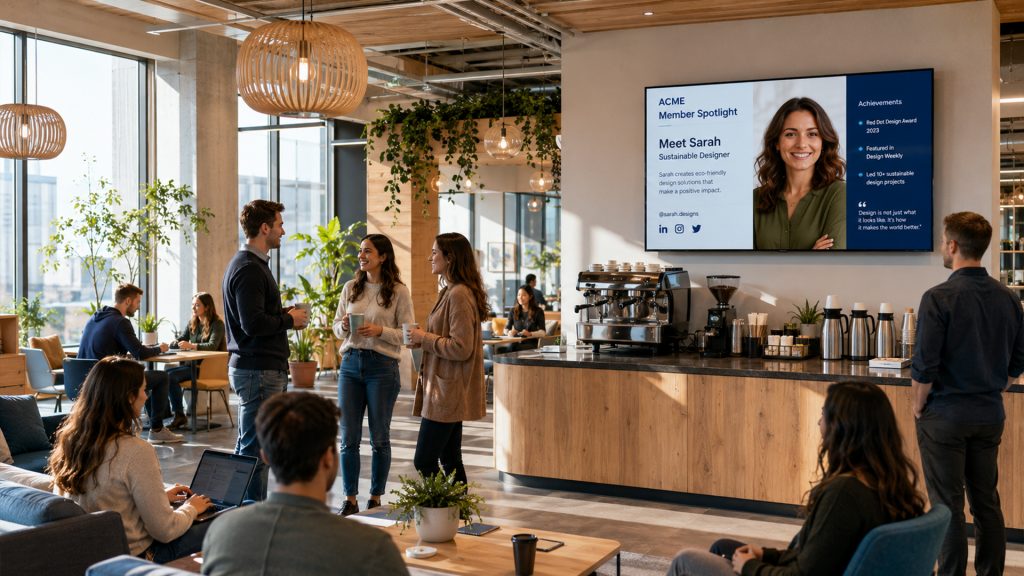
New member welcomes
A customized welcome slide to the lobby screen on the first day of joining the company, “Welcome to the space, Priya!” Almost nothing to make and a huge first impression. It communicates to the new member, to them, and to all others in the space that this is a community that sees and celebrates itself.
Community news and announcements.
Common area screens can be used to advertise member-driven events, skill-shares, project collaborations, open job positions, and apartment sublets, the informal glue that holds a coworking community together. Previously, these were on an easy-to-miss noticeboard or in a Slack channel, but now there’s a screen in the coffee area that makes them much more visible.
Social media walls
Some operators incorporate a hashtag belonging to their community into a live social media wall displayed on common-area monitors. Tagging members’ posts makes their content visible on the screen, which is enough for them to be recognized, resulting in a form of organic social promotion for the space. When operators organize events, social walls can help bring energy and a sense of community to the event in real time.
The psychology of belonging
All these uses of engagement share a common thread: “making the invisible visible.” Every coworking space has interesting people, exciting projects, and upcoming opportunities, but these are often overlooked because they lack a platform to showcase them. A well-designed screen program can help to put a face, voice, and presence on that community. Renew members are members who feel they’re seen and connected to a community.
Monetization, Turning Screens Into a Revenue Stream
This is what most coworking blogs fail to mention at all, and it’s a missed opportunity for coworking operators and content marketers who focus on them. There is a real opportunity for coworking operators to use digital signage as a real add-on business, and very few operators have systematically taken advantage of it. This is simple: these screens attract a focused, high-value audience, professionals, entrepreneurs, and decision-makers, for hours and hours and hours. This audience is commercially valuable, real.
Local business advertising
The easiest monetization approach is to sell ad spots to local companies that offer services relevant to co-workers. These are all obvious candidates, such as accountants, lawyers, insurance brokers, fitness studios, restaurants, and tech service providers. A 15-second rotating space on a high-traffic lobby display, viewed by 200-400 unique members each week, is a strong offer for any local business that lacks an affordable alternative for these visitors.
The price depends on market and screen positioning, but the typical cost for operators to maintain a presence across the entire screen network is between £200 and £800 per advertiser per month. With three to five advertisers, that’s a significant revenue stream which requires very little work to maintain after it’s established.
Event content sponsor branding
The event slides displayed on the lobby and common areas screens of an operator running a workshop or networking event are natural sponsor inventory. A local law firm that sponsors the “Founders Legal Clinic” will have its logo featured on the event-promotion slides, the welcome screen on the day of the event, and in the post-event recap content. It’s a top-tier placement with a top-tier price tag, and it’s a sponsorship that is truly ‘native’ and not intrusive.
Premium placement packages
A structured placement package (guaranteed slots on high-traffic screens at peak hours) is a product that can be sold to operators with multiple screens at multiple locations. Some operators incorporate this into an overarching ‘partner program’ which involves co-marketing on email, social, and signage.
The important thing is to maintain tasteful, relatable, and easily recognizable ads for the member audience and separate from community content. If the commercial messages are useful and well presented, members will accept these on screens. They will be aware of and object to screens that are like billboards in their workspace.
What Your Signage Data Tells You
Most coworking operators who introduce digital signage run it only when they are interested in the content displayed on the screens. Less is thought about the information going back. This information is passive, collected over time, and is one of the most underutilized aspects of the average coworking business.
Occupancy heatmaps
Room panel systems keep a record of every booking, check-in, check-out, and no-show in the modern era. This information accumulates over weeks and months to create a comprehensive profile of space utilization. The occupancy heatmap feature, available on most signage platforms integrated with booking systems, helps identify which rooms are consistently oversubscribed, which are always underused, and when demand for certain rooms rises.
This is highly helpful when planning space. If a company finds that its 4-person meeting rooms are 90% utilized and the 8-person boardroom is empty most of the week, the operator has solid reasons to rearrange the space to improve utilization or to adjust the price of its inventory to increase demand.
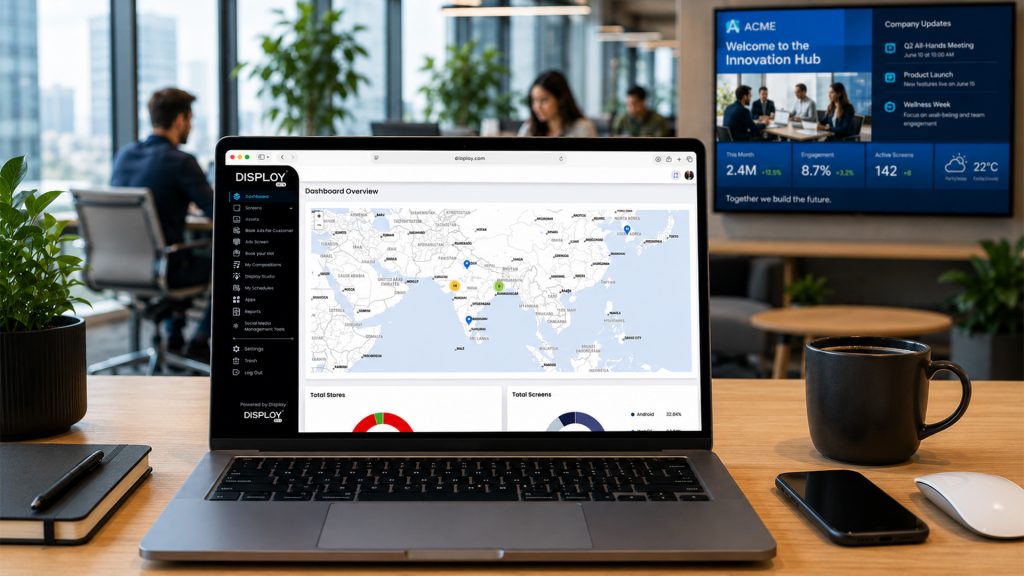
Dwell time and content engagement.
More advanced signage platforms come with camera-based audience measurement (anonymized, GDPR-compliant) that can provide data on how long viewers pause on their screens and what they view. This is especially helpful for operators offering ad space — it gives advertisers the statistics they need to demonstrate the performance of the ad space they’re buying.
With analytics at the CMS level, even without camera measurements, operators can get a baseline of how content is performing across all playlists, how long it runs, and on which screens.
Peak usage patterns
Using signage alongside access control logs creates a clear picture of the times of day and days of the week when most rooms are used. This helps to inform staffing (when to hire more; when to let people go home), provisions for amenities (when to put the coffee station on ice; when to advertise an event), and member communications (when to push out an event; when to promote an event).
Learning through the feedback on the experience
The most sophisticated operators form a feedback loop: signage data helps to shape space design, which in turn enhances the member experience, which in turn improves retention and referral rates. There is an obvious benefit to having a data-informed workspace, but it’s more than efficient; it’s profitable. Members who always feel comfortable, well provided for, and a good size for the group they serve are members who remain.
Conclusion
At its core, coworking spaces are in the business of selling productivity and community. When implemented judiciously, digital signage fulfills both of these promises. It clears up the blocking moments that irritate members, the room’s unavailability, the missed event, and the feeling of being lost in a crowd, to create moments of ease, connection, and belonging.
Each of the three pillars that we explored, room booking, events, wayfinding, and member engagement, is not a stand-alone feature. They are a series of unified member experiences, driven by the same screen network and the same content management system. It is the operators who take a systemic approach to signage, who see a signage system rather than a series of displays, who can realize the greatest benefit.
Digital signage is no longer just about the member experience; it’s also a business intelligence tool. The information it provides operators is not just about looking; it’s about occupancy, content engagement, peak usage times, and a competitive edge. A healthy coworking business model starts with information on space design, staffing, and pricing.
But for operators that are willing to go the extra mile, those screens are inventory. A high-quality audience that is captive and interested in commercial products and services, local businesses, and brand partners will pay to reach.
The technology has come to maturity, the integrations are solid, and the investment case is stronger than ever. Digital signage is the minimum standard that members are looking for, especially if you’re setting up your first space or expanding your network of spaces.
Looking to make digital signage part of your coworking space? To begin with, audit the current room-use data, identify your top member touchpoints, contact Disploy and get your 14-day free trial, and find more advantages of Digital Signage.